Radio Button Group
Places several radiobuttons in tabular form. Only one radiobutton can be on at any given time.
-
columnCount
Defines the amount of columns in which the radiobuttons are divided.
Example
If the columnCount is set to 3 and you define 7 radiobuttons the result is:
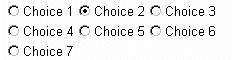
-
currentItem
Defines the item which has the focus.
-
id
Identification name of the radioButtonGroup.
-
onClick
Defines the event handling method that will be processed when the user clicks on one radio button. If 'onClick' is specified, the event handling routine is called.
-
selection
Specifies the key of the radioButton that is on in the radioButtonGroup.
-
verticalAlign
Sets the vertical alignment of the radiobutton column and the text column.
|
Attributes |
M |
Values |
Usage |
|
columncount |
Numeric (1) |
Taglib columnCount="3" Classlib setColumnCount(3) |
|
|
currentItem |
Numeric (1) |
Taglib No tag available Classlib setCurrentItem(2) |
|
|
id |
* |
String (cs) |
Taglib id="Genderselect" Classlib setId("Genderselect") |
|
selection |
String (cs) |
Taglib selection="rb_k1" Classlib setSelection("rb_k1") |
|
|
verticalAlign |
- |
Taglib No tag available Classlib setVerticalAlign(CellVAlign radioBCol, CellVAlign textCol) |
|
Events |
M |
Values |
Usage |
|---|---|---|---|
|
onClick |
String (cs) |
Taglib onClick="ProcessClick" Classlib setOnClick("ProcessClick") |
using the taglib
  <hbj:radioButtonGroup
    id="Genderselect"
    columnCount="2"
    selection="rb_fem"

    <hbj:radioButton
        id="RBGenderFemale"
        text="female"
        key="rb_fem"
        tooltip="I am female"
        disabled="false"
        />
    <hbj:radioButton
        id="RBGenderMale"
        text="male"
        key="rb_male"
        tooltip="I am male"
        disabled="false"
        />
  </hbj:radioButtonGroup>
using the classlib
    Form form = (Form) this.getForm();
    RadioButtonGroup rbg = new RadioButtonGroup("Genderselect");
    rbg.setColumnCount(2);
    RadioButton r1 = rbg.addItem("rb_fem", "female");
    RadioButton r2 = rbg.addItem("rb_male", "male");
    r1.setTooltip("I am female");
    r2.setTooltip("I am male");
    r2.setSelected(true);
    //     as alternative you can use
    //     rbg.setSelection("rb_male");
    form.addComponent(rbg);
Result
