Item List
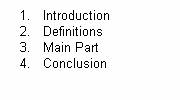
The item list can be displayed as bulleted or numbered (ordered) list. An element in an itemList is called listItem.
-
bulletUri
Sets the image that is displayed as bullet in the item list.
-
id
Identification name of the itemList.
-
ordered
A boolean value that defines if the list is displayed as bulleted (ordered="false") or numbered list (ordered="true").
|
Attributes |
M |
Values |
Usage |
|---|---|---|---|
|
bulletUri |
String (cs) |
Taglib No tag available Classlib setBulletUri(ImageUrl + "arrow.gif") |
|
|
id |
* |
String (cs) |
Taglib id="ImportantItems" Classlib setId("ImportantItems") |
|
ordered |
FALSE (d) TRUE |
Taglib ordered="TRUE" Classlib setOrdered(true) |
listItem
Defines the items in the itemList. A listItem can be built with any control (checkbox, image, textView etc.) and one listItem can contain more then one control.
using the taglib
 <hbj:itemList
    id="ImportantItems"
    ordered="true"
    >
    <hbj:listItem>
        <hbj:textView
            text="Introduction"
            />
    </hbj:listItem>
    <hbj:listItem>
        <hbj:textView
            text="Definitions"
            />
    </hbj:listItem>
    <hbj:listItem>
        <hbj:textView
            text="Main Part"
            />
    </hbj:listItem>
    <hbj:listItem>
        <hbj:textView
            text="Conclusion"
            />
    </hbj:listItem>
 </hbj:itemList>
using the classlib
    ItemList iteml = new ItemList();
    iteml.setOrdered(true);
    iteml.addText("Introduction");
    iteml.addText("Definitions");
    iteml.addText("Main Part");
    iteml.addText("Conclusion");
    form.addComponent(iteml);
Result