Simple Providers
For a simple provider you do not have to implement Java code. Simple providers can only contain XSL transformers. Simple transformers cannot use language properties ( ResourceBundle classes) and cannot customize the default behavior.
PAR Structure
The PAR file must have the following folder structure:
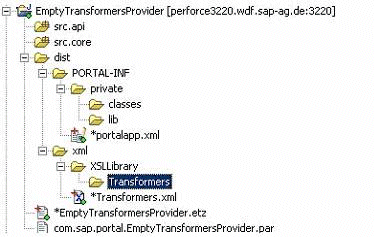
The folder named Transformers contains all the XSL files. Note that there are no Java files in the project.
If you want to use different folders you have to adjust the portalapp.xml file accordingly.
Portalapp.xml File
The portalapp.xml registers the provider with the PRT registry mechanism, declares the provider service and general application configurations.
-
Portal registry definition
Defines this PAR as a provider in the registry entry. The path attribute must be set as follows:
<registry> <entry path="runtime/transformers/com.sap.portal.EmptyTransformersProvider" name="TransformersProvider" type="service"/> </registry> -
Service configuration
Declare the provider as a service. The service must be defined as follows:
<services> <service name="TransformersProvider"> <service-config> <property name="className" value="com.sap.portal.httpconnectivity.transformationservice. TransformersProvider"/> <property name="classNameFactory" value=""/> <property name="classNameManager" value=""/> <property name="SecurityZone" value="com.sap.portal/no_safety" /> </service-config> </service> </services> -
Application configuration
Set the startup property to true so that the PRT will register the provider when deploying and not the first time that the service is called.
Example:
<application-config> <property name="ServicesReference" value="com.sap.portal.htmlb,com.sap.portal.transformationservice"/> <property name="releasable" value="false" /> <property name="startup" value="true" /> </application-config> -
Transformers.xml File
This file contains the provided transformers. The file must be located at <par folder>/dist/xml/transformers.xml. It is divided into a XSL and SAX part. Every transformer has a name, a description, from/to scheme, source name and version (See XML Transformation for more).
For an XSL transformer the source name property is the XSL file and in case of an SAX transformer it is the class name.
Example:
<?xml version="1.0" encoding="utf-8"?>
<transformation-resources>
  <transformers
    type="XSL">
    <!-- Holder of XSL transformers -->
    <transformer>
     <!-- Represet single transforemr -->
       <property
         name="Name"
         value="MY_RSS_TO_XHTMLB" />
       <!-- Key of the transformer-->
       <property
         name="Description"
         value="Transform RSS files to XHTMLB" />
       <property
         name="FromURI"
         value="RSS" />
       <!-- Source scheme URI -->
       <property
         name="ToURI"
         value="XHTMLB" />
       <!-- result scheme URI -->
       <property
         name="SourceName"
         value="RSS_TO_XHTMLB.xsl" />
       <!-- XSL file name -->
       <property
         name="Version"
         value="1.0" />
       </transformer>
    </transformers>
    <transformers
      type="SAX">
      <!-- Holder of the SAX transformers -->
      <transformer>
        <property
          name="Name"
          value="MY_UNIQUE_ID_ADDER" />
        <property
          name="Description"
          value="Add an unique id for every node in the XML" />
        <property
          name="FromURI"
          value="XML"/>
        <property
          name="ToURI"
          value="RSS"/>
        <property
          name="SourceName"
          value="com.sapportals.portal.httpconnectivity.
                 saxtransformerprovider.MyUIDAdderHandler" />
        <!-- Full class name -->
        <property
          name="Version"
          value="1.0" />
        </transformer>
    </transformers>
</transformation-resources>