Creating an OBN Link (Web Dynpro)
Prerequisites
-
You understand how portal navigation is triggered in Web Dynpro applications, as described in Navigating in the Portal .
-
You add the following imports:
importcom.sap.portal.obn.service.IOBNMetadata;
importcom.sap.portal.obn.service.IOBNService;
importcom.sap.portal.obn.service.OBNFactory;
Context
This section describes how to create an OBN link in a Web Dynpro application.
Procedure
-
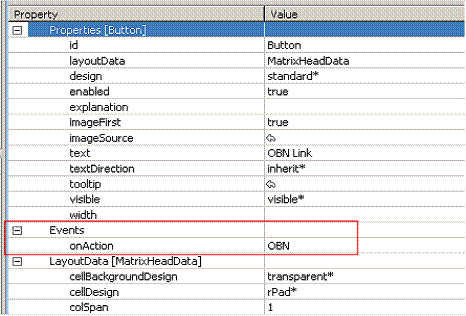
To your view, add a UI element that triggers navigation, such as a button element.

-
Add an event action to the UI element.
For example, to the onAction event of the button, add an action called OBN .
-
In the action handler method, do the following:
-
Create an instance of the OBNFactory helper class.
public voidonActionOBN(com.sap.tc.webdynpro.progmodel.api.IWDCustomEvent wdEvent ){ //@@begin onActionOBN(ServerEvent) boolean isPost = false; IOBNService obnService = (IOBNService) WDPortalUtils .getServiceReference(IOBNService.KEY); OBNFactory obnFactory = obnService.getObjectsFactory();NoteYou can also obtain an OBNFactory instance by using the static method OBNFactory.getInstance() .
-
Create an IOBNMetadata object for the business object and operation to which you want to navigate.
    IOBNMetadata obnMetaData = obnFactory
        .createOBNMetadata("myBO","","myOp",
        WDClientUser.getCurrentUser().getSAPUser());
There are many variations on creating an IOBNMetadata object. For example, you can instead specify only a business object, and the portal will navigate to the highest-priority operation for which the user has a valid implementation.
-
Get the OBN URL for the navigation.
String obnUrl = obnMD.getOBNUrl(false); -
Trigger navigation.
    try {
        WDPortalNavigation.navigateAbsolute(obnUrl,
            WDPortalNavigationMode.SHOW_INPLACE,
            null,
            null,
            WDPortalNavigationHistoryMode.NO_HISTORY,
            null,
            null,
            obnMetaData.getOBNUrlParametersString(),
            null,
            isPost,
            true);
        } catch(Exception e) {
            // Handle exceptions
        }
   //@@end
}
-