Creating Action Providers
Context
The portal provides sets of standard actions that can be included in an admin studio instance. For example, you can specify that the cut, copy and paste actions for working with portal objects are included.
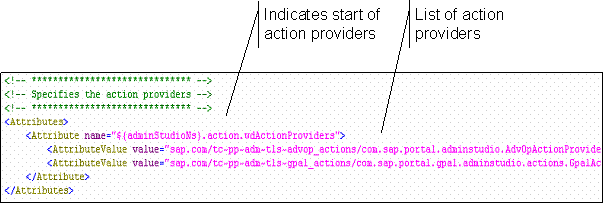
An action provider is a Web Dynpro application that performs actions. The following figure illustrates how to create action providers in the XML script:
Procedure
-
In the <context> element for the configuration, add an <Attributes> element.
-
In the <Attributes> element, add an <Attribute> element as follows:
<Attribute name="com.sap.portal.admin.studio.config.action.wdActionProviders">
-
Add one or more <AttributeValue> elements, each of which is the name of a Web Dynpro application that functions as an action provider. The following table lists the action providers available in the portal:
Provider
Description
sap.com/tc~pp~adm~tls~advop_actions/ com.sap.portal.adminstudio.AdvOpActionProvider
Provides the following generic actions for all PCD objects:
-
Cut
-
Copy
-
Paste
-
Delete
-
Change ID
sap.com/tc~pp~adm~tls~gpal_actions/ com.sap.portal.gpal.adminstudio.actions.GpalActionProvider
Provides the following generic actions for all GPAL objects:
-
Copy
-
Paste as PCD Object
sap.com/tc~pp~adm~ap~fav_action_provider/com.sap.tc.pp.adm.fav_action_provider.favactionprovider.FavActionProvider
Provides the Add to Favorites action for all portal objects
-
Results
The actions defined by the specified providers are displayed in the Portal Catalog.