Creating iView Instances Using Copy-Paste
You can instantaneously create new iViews without using the iView wizard (see Launching the iView Wizard and General Information ) by copying existing iView instances using the portal's Copy wizard.
Both paste methods ( Create a Copy and Create a Delta Link ) create new iViews that are delta links instances; however, the relation of the new object to the one being copied differs. This difference is illustrated in the figure below.
-
The Content Mirroring tool can also be used to duplicate content. Delta links are generated between the original and copied objects. See What Is Content Mirroring? .
-
To view the delta link source objects and dependents of an object, use the delta link tracer. See Tracing Delta Link Dependencies .
You use the Copy-Paste actions with iViews just as you would other object types in the Portal Catalog.
For general usage instructions and a description of the commands, see Copying an Object or Folder (Copy / Paste) .
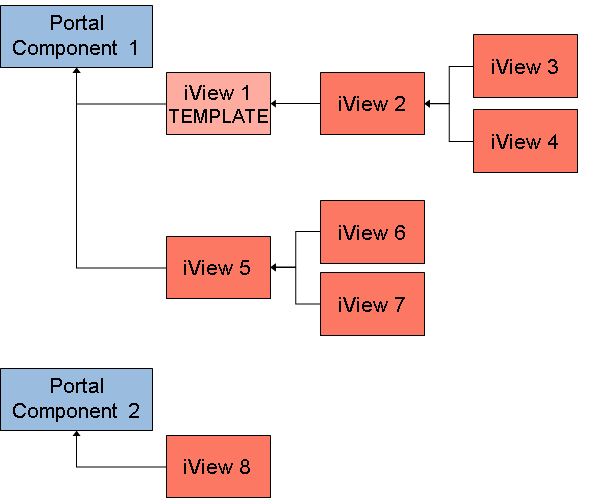
The following figure illustrates the concept of dependencies between iViews and portal components. The text following the figure describes how the iViews were created to generate the desired relationships.
The delta link chain of an iView always points to a portal component in the application repository. The portal component provides the functionality of the iView.
-
iView 1 was created using the iView Wizard, and is based on portal component 1. The user creating the iView defined the new iView as a template . Templates make objects available in the iView Wizard, so that authorized users can use them to create other iViews based on that template.
-
iView 2 was created using the iView Wizard and is based on the iView 1 template. iView 2 is a "delta link" instance to iView 1.
-
iView 3 was created using the Copy action on iView 2 and choosing Create a Delta Link in the Copy Wizard. iView 3 is a "delta link" instance to iView 2.
-
iView 4 was created using the Copy action on iView 3 and choose Create a Copy in the Copy Wizard. iView 4 is a "delta link" instance to iView 2. At the time of its creation, iView 4 is an identical copy of iView 3 (they are siblings). However, when changes are made to iView 3 they are not updated in iView 4, and vice versa; they cease to be identical. When the properties of iView 2 are updated, both iView 3 and 4 inherit these changes simultaneously.
NoteNote that iView 4 could have been created using the Create a Delta Link paste method on iView 2, however if manual changes in property values existed in iView 3 at the time iView 4 was created, they would not have appeared in iView 4.
-
iView 5 was created using the iView Wizard, and is based on a portal component 1.
-
In the same way that iView 4 was created, iView 6 and 7 were generated using the Create a Delta Link paste method on iView 5. iView 6 and 7 are both "delta link" instances to iView 5.
-
iView 8 was created using the iView Wizard, and based on a portal component 2.
For more information about portal object relationships, see How Are Portal Objects Linked? .