
Reading Data from Presentation Server (Dialog)
To read data from the presentation server into an internal table with a user dialog, use the function module UPLOAD. The most important parameters are listed below. For more information, refer to the function module documentation in the Function Builder (Transaction SE37).
Important Import Parameters
Parameters |
Function |
CODEPAGE |
Only for upload under DOS: Value IBM |
FILENAME |
Filename (default value for user dialog) |
FILETYPE |
File type (default value for user dialog) |
ITEM |
Title for dialog box |
Use the FILETYPE parameter to specify the transfer mode. Possible values:
Binary files
ASCII files: Text files with end of line markers.
Excel files, saved as text files with columns separated by tabs and lines separated by line breaks.
Excel and Lotus files saved as WK1 spreadsheets.
Important Export Parameters
Parameters |
Function |
FILESIZE |
Number of bytes transferred |
ACT_FILENAME |
Filename (as entered in the user dialog) |
ACT_FILETYPE |
File type (as entered in the user dialog) |
Tables Parameters
Parameters |
Function |
DATA_TAB |
Internal table (target for the import) |
Exceptions Parameters
Parameters |
Function |
CONVERSION_ERROR |
Error converting data |
INVALID_TABLE_WIDTH |
Invalid table structure |
INVALID_TYPE |
Incorrect FILETYPE parameter |

Suppose the presentation server is running under Windows NT, and contains the following Excel file:
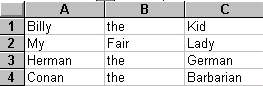
If this table is saved as a text file "D:\temp\mytable.txt" with tabs between the columns, the following program can read the table:
PROGRAM SAPMZTST.
DATA: FNAME(128), FTYPE(3), FSIZE TYPE I.
TYPES: BEGIN OF LINE,
COL1(10) TYPE C,
COL2(10) TYPE C,
COL3(10) TYPE C,
END OF LINE.
TYPES ITAB TYPE LINE OCCURS 10.
DATA: LIN TYPE LINE,
TAB TYPE ITAB.
CALL FUNCTION 'UPLOAD'
EXPORTING
CODEPAGE = 'IBM'
FILENAME = 'd:\temp\mytable.txt'
FILETYPE = 'DAT'
ITEM = 'Read Test for Excel File'
IMPORTING
FILESIZE = FSIZE
ACT_FILENAME = FNAME
ACT_FILETYPE = FTYPE
TABLES
DATA_TAB = TAB
EXCEPTIONS
CONVERSION_ERROR = 1
INVALID_TABLE_WIDTH = 2
INVALID_TYPE = 3.
WRITE: 'SY-SUBRC:', SY-SUBRC,
/ 'Name :', (60) FNAME,
/ 'Type :', FTYPE,
/ 'Size :', FSIZE.
SKIP.
LOOP AT TAB INTO LIN.
WRITE: / LIN-COL1, LIN-COL2, LIN-COL3.
ENDLOOP.
The program displays the following dialog box:
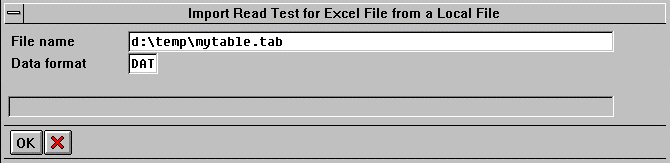
Here, the user can change the default values. When the user chooses Transfer, the system imports the data from the file D:\temp\mytable.txt into the internal table TAB.
The output appears as follows:
SY-SUBRC: 0
Name : d:\temp\mytable.txt
Type : DAT
Size : 69
Billy the Kid
My Fair Lady
Herman the German
Conan the Barbarian
The contents of the internal table TAB are exactly the same as the contents of the original Excel table.