Dropdown Boxes
As well as input help, which appears in separate dialog boxes, you can also define input/output fields as dropdown boxes. A dropdown box offers the user a predefined set of input values from which to choose. It is not possible to type a entry into a dropdown box, instead, the user must use one of the values from the list. When the user chooses a value, the PAI event can be triggered simultaneously. If you use a dropdown box for a field, you cannot at the same time use the input help button.
List boxes are currently the only type of dropdown box supported. A list box is a value list containing a single text column of up to 80 characters. Internally, each text field has a key of up to 40 characters. When the user chooses a line, the contents of the text field are placed in the input field on the screen, and the contents of the key are placed in the screen field. The contents and length of the input/output field and the screen field are not necessarily the same.
To make an input/output field into a listbox, you must set the value L or LISTBOX in the Dropdown attribute in the Screen Painter. The visLg attribute determines the output width of the list box and the field. You can assign a function code to a listbox field. In this case, the PAI event is triggered immediately when the user chooses a value from the list, and the function code is placed in the SY-UCOMM and OK_CODE fields. If you do not assign a function code, the PAI event must be triggered in the usual way, that is, when the user chooses a pushbutton or an element from the GUI status.
If you have assigned a list box to an input/output field, you can use the Value list attribute of the screen element to determine how the value list should be compiled. There are two possibilities:
If you do not enter anything in the value list attribute, the text field uses the first column displayed in the
If you enter A in the value list attribute, you must fill the value list yourself before the screen is sent (for example, in the PBO event) using the function module VRM_SET_VALUES. When you do this, you must pass an internal table with the type VRM_VALUES to the import parameter VALUES of the function module. VRM_VALUES belongs to the type group VRM. The line type is a structure consisting of the two text fields KEY (length 40) and TEXT (length 80). In the table, you can combine possible user entries from the KEY field with any texts from the TEXT component. You specify the corresponding input/output field in the import parameter ID.

Dropdown list boxes
REPORT DEMO_DYNPRO_DROPDOWN_LISTBOX.
TYPE-POOLS VRM.
DATA: NAME TYPE VRM_ID,
LIST TYPE VRM_VALUES,
VALUE LIKE LINE OF LIST.
DATA: WA_SPFLI TYPE SPFLI,
OK_CODE LIKE SY-UCOMM,
SAVE_OK LIKE SY-UCOMM.
TABLES DEMOF4HELP.
NAME = 'DEMOF4HELP-CONNID'.
CALL SCREEN 100.
MODULE CANCEL INPUT.
LEAVE PROGRAM.
ENDMODULE.
MODULE INIT_LISTBOX OUTPUT.
CLEAR DEMOF4HELP-CONNID.
SELECT CONNID CITYFROM CITYTO DEPTIME
FROM SPFLI
INTO CORRESPONDING FIELDS OF WA_SPFLI
WHERE CARRID = DEMOF4HELP-CARRIER2.
VALUE-KEY = WA_SPFLI-CONNID.
WRITE WA_SPFLI-DEPTIME TO VALUE-TEXT
USING EDIT MASK '__:__:__'.
CONCATENATE VALUE-TEXT
WA_SPFLI-CITYFROM
WA_SPFLI-CITYTO
INTO VALUE-TEXT SEPARATED BY SPACE.
APPEND VALUE TO LIST.
ENDSELECT.
CALL FUNCTION 'VRM_SET_VALUES'
EXPORTING
ID = NAME
VALUES = LIST.
ENDMODULE.
MODULE USER_COMMAND_100.
SAVE_OK = OK_CODE.
CLEAR OK_CODE.
IF SAVE_OK = 'CARRIER'
AND NOT DEMOF4HELP-CARRIER2 IS INITIAL.
LEAVE TO SCREEN 200.
ELSE.
SET SCREEN 100.
ENDIF.
ENDMODULE.
MODULE USER_COMMAND_200.
SAVE_OK = OK_CODE.
CLEAR OK_CODE.
IF SAVE_OK = 'SELECTED'.
MESSAGE I888(BCTRAIN) WITH TEXT-001 DEMOF4HELP-CARRIER2
DEMOF4HELP-CONNID.
ENDIF.
ENDMODULE.
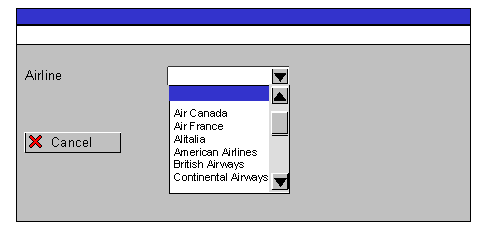
The next screen (statically defined) for screen 100 is 200. It has the following layout:
The component CARRIER2 of the ABAP Dictionary structure DEMOF4HELP is assigned to the input field. Its Dropdown attribute is set to L, and it has the output length 15. The Value list attribute is empty, and it has the function code CARRIER. The pushbutton has the function code CANCEL with function type E.
The screen flow logic is as follows:
PROCESS BEFORE OUTPUT.
PROCESS AFTER INPUT.
MODULE CANCEL AT EXIT-COMMAND.
MODULE USER_COMMAND_100.
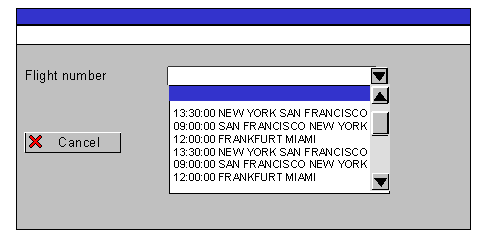
The next screen (statically defined) for screen 200 is 100. It has the following layout:
The component CONNID of the ABAP Dictionary structure DEMOF4HELP is assigned to the input field. Its Dropdown attribute is set to L, and it has the output length 30. The Value list attribute is set to A, and it has the function code SELECTED. The pushbutton has the function code CANCEL with function type E.
The screen flow logic is as follows:
PROCESS BEFORE OUTPUT.
MODULE INIT_LISTBOX.
PROCESS AFTER INPUT.
MODULE CANCEL AT EXIT-COMMAND.
MODULE USER_COMMAND_200.
The user cannot type any values into the screen fields. When he or she chooses the input field on screen 100, a value list appears in the list box, compiled from the input help for the field DEMOF4HELP-CARRIER2. This is the search help H_SCARR, which is assigned to the check table SCARR. The value list contains the names of the airlines. When the user chooses an entry, the screen field is filled with the airline code, and the PAI event is triggered. The module USER_COMMAND_100 checks the OK_CODE field and calls screen 200.
In the PBO event of screen 200, an internal table LIST is filled with values from the database table SPFLI. The KEY field is filled with the flight numbers, and other relevant information is placed in the TEXT field. The table LIST is then passed to the function module VRM_SET_VALUES. When the user chooses the input field on screen 200, the TEXT column of the internal table is displayed in the list box. When the user chooses an entry, the screen field is filled with the corresponding entry from the KEY field, and the PAI event is triggered. The module USER_COMMAND_200 checks and processes the OK_CODE field.