
Printing from within the Program
To start the printing process from within the program while creating a list, use the NEW-PAGE statement with the PRINT ON option:
Syntax
NEW-PAGE PRINT ON [NEW-SECTION]
[<params> | PARAMETERS <pripar>]
[ARCHIVE PARAMETERS <arcpar>]
[NO DIALOG].
All output after this statement is placed on a new page (see Unconditional Page Break), and the system interprets all subsequent output statements as print statements. In other words, starting from NEW-PAGE PRINT ON, the system no longer creates the list for display but for the spool system.
If you use the NEW-PAGE PRINT ON statement without the NEW-SECTION option while already creating a list for the spool system, the statement is of no effect.
If you use the NEW-SECTION option, you reset pagination (SY-PAGNO system field) to 1. If the system is already creating a list for the spool system, NEW-SECTION may have two effects:
The other options determine the print parameters (see below).
The end of a processing block (events during data retrieval or interactive events) automatically ends the print process. To stop creating the list for the spool system explicitly, use the PRINT OFF option of the NEW-PAGE statement:
Syntax
NEW-PAGE PRINT OFF.
This statement creates a page break and sends the last page to the spool system. Any output statements following this statement appear in the list on the output screen.
Determining Print Parameters
To determine the print parameters for printed output following the NEW- PAGE PRINT ON statement, use the options of the statement.
You can use several options <params> to specify each print parameter (for example DESTINATION <dest>). The keyword documentation explains each option. Use the NO DIALOG option to tell the system whether to display or suppress the Print List Output dialog box. This method of setting print parameters has its disadvantages, since the system does not check whether the parameters specified are complete. Incomplete print parameters are detected only if you use the Print List Output dialog box. However this is not possible for background jobs. If the print parameters are incomplete and you use the NO DIALOG option, the system sends a warning after the syntax check, but it does not stop processing. This may cause unpredictable results when executing the program.
SAP, therefore, recommends not to use the <params> options. Use the PARAMETERS option instead, and the ARCHIVE PARAMETERS option if necessary. To create the corresponding arguments <pripar> and <arcpar>, use the export parameters of the function module GET_PRINT_PARAMETERS (see Setting Print Parameters from the Program). This is the only method that guarantees a complete set of print parameters and an executable print request. Since the function module GET_PRINT_PARAMETERS has its own user dialog, always use the NO DIALOG option in the NEW-PAGE PRINT ON statement.

REPORT SAPMZTST NO STANDARD PAGE HEADING.
DATA: VAL,
PRIPAR LIKE PRI_PARAMS,
ARCPAR LIKE ARC_PARAMS,
LAY(16), LINES TYPE I, ROWS TYPE I.
CALL FUNCTION 'GET_PRINT_PARAMETERS'
IMPORTING
OUT_PARAMETERS = PRIPAR
OUT_ARCHIVE_PARAMETERS = ARCPAR
VALID = VAL
EXCEPTIONS
ARCHIVE_INFO_NOT_FOUND = 1
INVALID_PRINT_PARAMS = 2
INVALID_ARCHIVE_PARAMS = 3
OTHERS = 4.
IF VAL <> SPACE AND SY-SUBRC = 0.
SET PF-STATUS 'PRINT'.
WRITE ' Select a format!'.
ENDIF.
TOP-OF-PAGE DURING LINE-SELECTION.
WRITE: 'Page', SY-PAGNO.
ULINE.
AT USER-COMMAND.
CASE SY-UCOMM.
WHEN 'PORT'.
LAY = 'X_65_80'.
LINES = 60.
ROWS = 55.
PERFORM FORMAT.
WHEN 'LAND'.
LAY = 'X_65_132'.
LINES = 60.
ROWS = 110.
PERFORM FORMAT.
ENDCASE.
FORM FORMAT.
CALL FUNCTION 'GET_PRINT_PARAMETERS'
EXPORTING
IN_ARCHIVE_PARAMETERS = ARCPAR
IN_PARAMETERS = PRIPAR
LAYOUT = LAY
LINE_COUNT = LINES
LINE_SIZE = ROWS
NO_DIALOG = 'X'
IMPORTING
OUT_ARCHIVE_PARAMETERS = ARCPAR
OUT_PARAMETERS = PRIPAR
VALID = VAL
EXCEPTIONS
ARCHIVE_INFO_NOT_FOUND = 1
INVALID_PRINT_PARAMS = 2
INVALID_ARCHIVE_PARAMS = 3
OTHERS = 4.
IF VAL <> SPACE AND SY-SUBRC = 0.
PERFORM LIST.
ENDIF.
ENDFORM.
FORM LIST.
NEW-PAGE PRINT ON
NEW-SECTION
PARAMETERS PRIPAR
ARCHIVE PARAMETERS ARCPAR
NO DIALOG.
DO 440 TIMES.
WRITE (3) SY-INDEX.
ENDDO.
ENDFORM.
This program immediately calls the function module GET_PRINT_PARAMETERS without passing import parameters. In the Print List Output dialog box, the user can enter the print and archiving parameters for this program. The system passes these parameters, using the export parameters of the function module, to the structures PRIPAR and ARCPAR. To guarantee that the parameters are complete and consistent, the program runs the user dialog and checks the return value of VALID.
After completing the dialog, the system displays the following basic list:
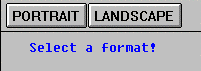
In the status PRINT of the basic list, the function codes PORT and LAND are assigned to the function keys
The subroutine FORMAT calls the function module GET_PRINT_PARAMETERS. When it does so, it passes the parameters PRIPAR and ARCPAR as import parameters. The values from LAY, LINES, and ROWS are assigned to the import parameters LAYOUT, LINE_COUNT and LINE_SIZE respectively. There is no user dialog. The system returns the parameters to the structures PRIPAR and ARCPAR. The function of the subroutine call is to set the components PAART, LINCT, and LINSZ of the structure PRIPAR with new values.
After checking the parameters for completeness and consistency, the program calls the subroutine LIST. This subroutine sends a list to the spool system using NEW-PAGE PRINT ON, thereby determining the print and archiving parameters using PRIPAR and ARCPAR. A user dialog is not necessary, since all settings required were made by GET_PRINT_PARAMETERS.
To view the stored spool requests, the user can choose System
® Services ® Print requests. After choosing PORTRAIT, the spool request may look like this: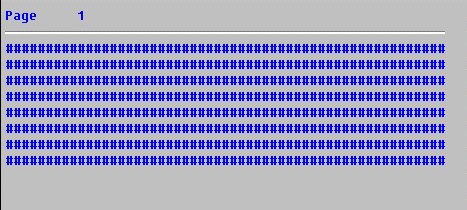
After choosing LANDSCAPE, however, the spool request looks like this:
