 Making SAP NetWeaver ILM Available
To use SAP NetWeaver Information Lifecycle Management (SAP NetWeaver ILM)
to manage data, you need to make the preparatory settings in the relevant system. Depending on which ILM application scenario you are using, the settings are required in the following systems:
ILM Application Scenario |
SAP System on Which ILM Runs |
|---|---|
Retention Management for data volume optimization |
Live application system |
System Decommissioning - made possible with lifecycle management of data from legacy system in a central system |
Stand-alone Retention Warehouse system |
 Recommendation
Before you start using SAP NetWeaver ILM, check that the archiving scenario you are currently using is controlled by the rules for Archive Routing. When you start to use SAP NetWeaver ILM, the Information Retention Manager rule engine assumes this task. The rules defined in Archive Routing are no longer taken into account. For more information, see: Making Customizing Settings for ILM Rules
Overview of Configuration Steps
The following figure illustrates the system components and configuration steps that are required in order to make SAP NetWeaver ILM
available in the context of both application scenarios.
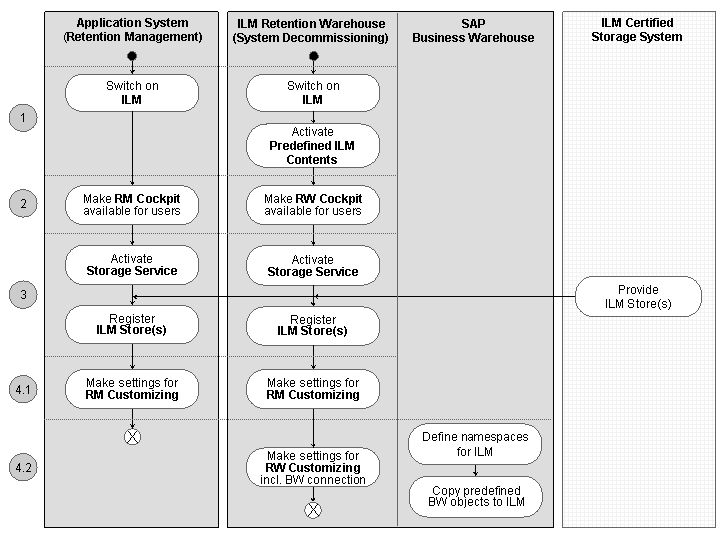
System Components and Configuration Steps for SAP NetWeaver ILM
Procedure
To make ILM-specific enhancements to the data archiving functions and to apply ILM function, activate
SAP NetWeaver ILM
in the system (application system or ILM Retention Warehouse).For more information, see: Activating SAP NetWeaver ILM
Assign the roles with the relevant authorizations to the users who will be working with
SAP NetWeaver ILM
and make ILM functions available with the relevant cockpit.For more information, see: Assigning Authorizations for SAP NetWeaver ILM
Provide stores for
SAP NetWeaver ILM
. Make the configuration according to the service that the stores use.For more information, see: Providing Stores for SAP NetWeaver ILM
Configure the ILM functions.
Familiarize yourself with the Customizing settings delivered by SAP for the Retention Management functions and make adjustments as needed.
For more information, see: Preparing to Use Retention Management Functions
For system decommissioning only: Configure the Retention Warehouse system and prepare the data in the legacy system for the transfer to the Retention Warehouse system.
For more information, see: Preparing to Use the Retention Warehouse System
Make sure you have taken all necessary measures to protect your data.
For more information, see: Data Security in SAP NetWeaver ILM