Recovery Solution
Backup and recovery utilities are functional elements of every database system. Recovery utilities use their knowledge of the physical database structures to allow you restore backed up data as quickly as possible. Using programs based on normal SQL interfaces to restore backups would take significantly longer.
Each client represents only a small section of the entire data. This leads to the question of whether and how to reset a single client. This section only deals with recoveries for multiple client systems, when the data of a single client has been totally destroyed by handling errors (for example, by a background job with incorrect parameters). A normal database recovery would also reset all the other (undamaged) clients to an older state. This action could lose data in these clients, since all entries made after the reset time would be lost, and need to be repeated. This is often not possible.
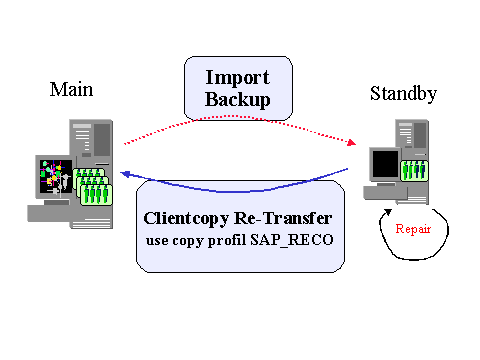
A single client recovery solution, however, is possible, using client transport tools; although it requires more time and effort than using the database recovery utilities. When recovering a single client, the backup is located on a separate standby host. This restores the data back to consistency. The modifications are repeated for the affected client (under corrected conditions) and updated. As soon as possible (in the following night or on the weekend) the updated client is restored to its original system. See also SAP Note 31496  . If necessary, all system activity must take place on the replacement host until the data can be transported back. This places more strain on network and communications. Until the client is restored, all changes to cross-clients must be made in parallel in both systems, or, if possible, delayed.
As already stated, this emergency solution demands more effort than a database recovery:
The standby host must have a least the same dimensions as the production host, so that the backup can be located there.
The final transport back to the production host cannot be made by database utilities. Instead a client transport is used; a program that is based on the SQL interface. Even though this transport is restricted to client-specific tables, it will be considerably slower than the restore time of the database utilities.
If the client you are repairing needs to be used in the recovery system temporarily, then you must schedule extra time for setting up network and communication links, and testing them.
Other recovery scenarios, in which the entire database is destroyed, will always affect all clients, even in a multiple client system, and require the use of database utilities.
The following diagram shows a single client backup scenario based on a client copy: