
 Security Monitor

Use
You can use this
monitor to monitor messages in the Security Audit Log, broken down into
various areas, and to monitor security-relevant messages in the system log
(see also
 Comparing the Security
Audit Log and the System Log).
Comparing the Security
Audit Log and the System Log).
Prerequisites
You must have activated the Security Audit Log (transaction SM19).
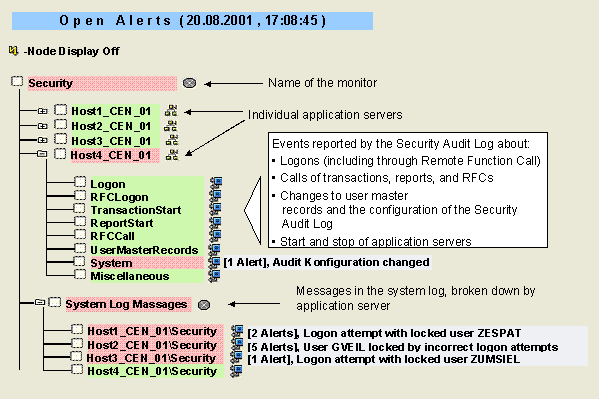
Features
The monitor contains the following monitoring tree elements (MTEs):
MTE Name |
Meaning |
Logon |
System logon events reported by the Security Audit Log: ● Successful logons, unsuccessful logon attempts, and log offs by a user ● Locking of a user due to unsuccessful logon attempts, and the removal of the lock |
RFCLogon |
RFC/CPIC logon events reported by the Security Audit Log: ● Successful RFC/CPIC logon ● Unsuccessful RFC/CPIC logon attempt |
TransactionStart |
Transaction events reported by the Security Audit Log: ● Transaction started and failed transaction start ● Transaction locked or unlocked |
ReportStart
|
Events connected with starting reports reported by the Security Audit Log: ● Successful start ● Failed start |
RFCCall
|
Events connected with calling Remote Function Calls (RFCs) reported by the Security Audit Log: ● Successful call ● Unsuccessful call |
UserMasterRecords
|
Events connected with changes to user master records reported by the Security Audit Log: ● User deleted, locked, or unlocked ● User master or authorizations of a user changed ● Authorization/authorization profile created, changed, or deleted |
System
|
Events connected to system parameter changes reported by the Security Audit Log: ● Configuration of the Security Audit Log changed ● Application server started or stopped |
Miscellaneous
|
Other events reported by the Security Audit Log: ● Download of a file ● Call of a digital signature ● Test message |
System
Log Messages |
Messages
in the
|
The system records security-relevant actions in the Security Audit Log. You decide which actions are recorded there and which should trigger an alert in the Alert Monitor on the Security Audit Log configuration screen (transaction SM19).
See also Defining Filters
Activities
To start the monitor, follow the procedure below:
...
1. Start the Alert Monitor using transaction RZ20 or choose CCMS → Control/Monitoring → Alert Monitor.
2. On the CCMS Monitor Sets screen, expand the SAP CCMS Monitor Templates set.
3. Start the Security monitor from the list by double-clicking it.