 Business Scenario
Definition
A Business Scenario completely models the exchange of messages for a collaborative process and provides an overview of the process flow.
Structure
A Business Scenario is a design object of the Integration Builder, is uniquely identified by a name and a namespace, and is subject to versioning.
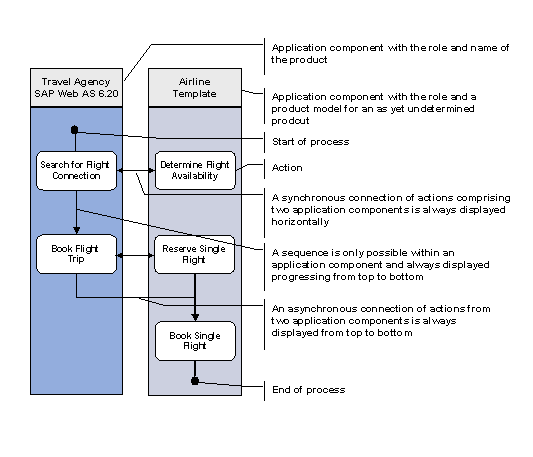
To model the exchange of messages and the process flow, the Business Scenario comprises the objects described below. The graphic illustrates how these objects are related using the Business Scenario example Booking a Flight Trip.
Business Scenario Booking a Flight Trip and Objects Used
Application Component
An application component is a modeling construct within a Business Scenario. Logically speaking, it represents a participant of a Business Scenario. This contains the business tasks and concern that this participant represents within the Business Scenario.

Application components are represented with colored columns.
An application component can stand for a business partner or a component of a business partner. At runtime it would be either one or more business systems.
The specification of a role and a product help to describe application components in more detail.
The role describes the task area that the application component is responsible for on a semantic level. Examples of roles of different business partners are customers and vendors.
A product determines the tasks of an application component. Examples of products are SAP APO 3.0A and SAP R/3 4.6C.
The product of an application component can be either of the following:
· A product defined in the System Landscape Directory
· A model for a product that is not defined in the System Landscape Directory or is not specified in more detail at the time of design
With the latter you have the option of producing a Business Scenario, the implementation of which is unknown or is not defined in the System Landscape Directory (for example, for non-SAP products).
Action
An action represents a function within an application component that is not subdivided further. Actions subdivide the process flow of the Business Scenario.
Actions are shown as white rectangles. The vertical progression of actions from top to bottom corresponds to the logical process flow.
An action is an independent design object of the Integration Builder. This means that actions are defined independently of Business Scenarios. Thus you have the option of reusing actions in different Business Scenarios.
Note the following for actions: They are used within application components where the product is
· either defined in the System Landscape Directory or
· is only a model and is not defined in the System Landscape Directory.
For more information, see the modeling actions section.
All interfaces associated with an action are assigned to that action in the Integration Builder.
The exchange of messages between components takes places between two actions from different application components. The interfaces used in the message exchange are assigned to the two actions involved.
Interfaces and Mapping
Interfaces define the data format of the messages that are used when messages are exchanged between actions from different application components. Furthermore, the properties of the interfaces involved determine whether communication takes place synchronously or asynchronously.
For more information on interfaces, see the interface-based processing of messages section in this documentation.
If mappings exist between outbound and inbound interfaces, then you can select a mapping for the Business Scenario.
Connection
A connection is a link between two actions within a Business Scenario. The following different types of connections exist:
Sequence
Sequence represents the sequence of two actions within the same application component. A sequence is required for portraying the Business Scenario process, however it contains no additional information.
Cross-Component Connection
A cross-component connection connects actions from different application components with each other. These actions exchange messages with each other in a Business Scenario. A cross-component connection defines the interfaces and mappings used.
Cross-component connections differentiate between synchronous and asynchronous communication.
A connection is not an object that can be reused. It is only defined within a particular Business Scenario.
Beginning and End of the Process
The beginning and end of a process run can be defined for a Business Scenario. Select actions can be defined as start actions and end actions for this purpose. There can be more than one start or end action.
WSCI Interface
All descriptions of Business Scenarios within the Integration Builder conform to WSCI (Web Service Choreography Interface) to create a basis for the standardized exchange of Business Scenarios. A WSCI interface represents all the inbound and outbound channels (including dependencies) of an application component that is involved in a Business Scenario. Therefore, each application component has a corresponding WSCI interface that needs to be named accordingly.
For further information about WSCI, see:
http://www.w3.org/TR/2002/NOTE-wsci-20020808/
Products and Software Component Versions
Products and software component versions are defined in the System Landscape Directory. They play a central role in the definition of Business Scenarios. Products are software units that can be installed on your system and that run independently of other software. (Example: SAP R/3 4.6C). Products generally comprise multiple software component versions. Software component versions are independent development units at SAP that cannot function on their own and are not shipped as such. (Examples: SAP BASIS 4.6C, SAP APPL 4.6C, SAP HR 4.6C).
Also see:
· The concepts introduced here are illustrated in the Example of a Business Scenario section.
· For detailed information about the semantic concepts, see the Modeling Business Scenarios section.
