Mapping Relations with Interface
Splitting
Mapping Relations with Interface
Splitting 
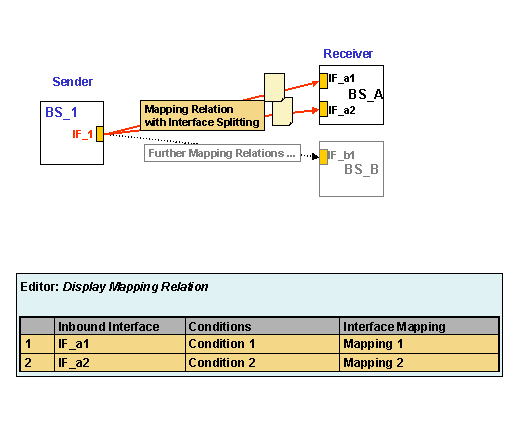
In certain instances it may be necessary to assign multiple inbound interfaces on the receiver side when defining a mapping relation.

Example: A very large IDoc interface is being used on the outbound side at the sender. However, on the inbound side at the receiver, only small IDoc interfaces are available for processing the message. In this case, the message must be divided up and sent to multiple inbound interfaces.
You have the option here of formulating conditions for the distribution of the message to the various receiver interfaces.
An interface splitting of this type is
indicated in the Display/Change Mapping Relation editor by multiple
table lines. An additional Conditions column is shown in the table that
displays the conditions for forwarding the message to the corresponding
interface. In change mode you can choose the search help icon ( ) to call the conditions
editor.
) to call the conditions
editor.
You have the following functions in the Display/Change Mapping Relation editor to help you here:
Functions for Editing Tables
(only visible in change mode)
|
Icon |
Function |
|
|
Inserts a line below the selected line |
|
|
Deletes the selected line (only possible if at least one line is in the table) |
|
|
Moves the selected line upwards (only possible if at least two lines are in the table) |
|
|
Moves the selected line downwards (only possible if at least two lines are in the table) |
|
|
· In the Inbound Interface column Calls search help to select the inbound interface · In the Condition column (for more than two lines) Calls the conditions editor. · In the Interface Mapping column Calls search help for the interface mapping |


The graphic below illustrates a mapping relation that has been assigned multiple receiver interfaces.
Example of a Mapping Relation with Interface Splitting