ABAP Proxy Objects
Definition
All ABAP objects that are created when you generate an interface object from the Integration Repository in an SAP system are called ABAP Proxy Objects.
Structure
You can divide the different interface objects (the objects from the Integration Repository from which you generate proxies) into two classes: The message interface itself and the corresponding parameters and data types (also see:
Converting WSDL to the Target Language). Also, after generation, the system assigns each generated proxy object to its corresponding Interface Object in the Integration Repository. The ABAP proxy generation function notes this assignment using meta data, which is transported with the proxy object.Interfaces
There are two types of interfaces, synchronous and asynchronous. In the case of asynchronous interfaces, the sender system can continue with the business process locally after it has sent the message, since the receiver system does not return a response to the sender system. In the case of synchronous interfaces, the receiver system returns a result, therefore the sender system is blocked until the response has arrived.
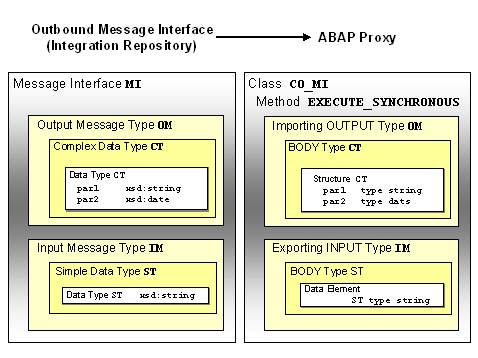
You call an outbound interface to send a message to an inbound interface. An outbound interface is mapped to an ABAP object class (prefix
CO_).You call an inbound interface to start a service that, in the synchronous case, returns a result. The proxy generation functions generate an ABAP object interface (prefix
II_) for an inbound interface; you must implement this interface using an ABAP object class to make this service available.
This class must be recognized by the ABAP Proxy Framework so that it can call the appropriate method when a message arrives. The proxy generation function enters an implementing class as the default setting on the tab page
The system generates methods with the following names, depending on the type of communication:
These names count regardless of whether the interfaces are inbound or outbound interfaces.
Parameters and Data Types
The following can be established for both inbound and outbound interfaces:
Proxy generation saves a reusable data type in the ABAP Dictionary for global XSD data types, for example data elements or structures. Proxy generation generates fields of a structure for local elements or attributes. The reuse of data types in the Integration Repository is reflected in the data types created in the system.
Tables
There is no explicit table type in XSD. However, you can define elements so that there is no limit to how often they may occur (also see:
Elements and Attributes). For example, assume you require a data type staff, which you can use to select a group of colleagues as members of staff and assign them a manager. The following table reflects the definition of this data type in the XSD editor:Definition of an Unbounded XSD Element Within a Structure
|
Structure |
Category |
Type |
Occurrence |
Description |
|
|
staff |
Complex Type |
||||
|
[-] manager |
Element |
1 |
staff manager |
||
|
name |
Element |
xsd:string |
1 |
||
|
birthday |
Element |
xsd:date |
1 |
||
|
[-] employee |
Element |
1..unbounded |
staff members |
||
|
name |
Element |
xsd:string |
1 |
||
|
birthday |
Element |
xsd:date |
1 |
||
According to this definition, the element
employee can occur more than once in the corresponding XML schema. For employee, the proxy generation functions generate an ABAP Dictionary table type and a structure for the line type with the fields name and birthday.Integration
You cannot change ABAP proxy objects manually in the SAP system. You can only change an ABAP proxy object by calling transaction
SPROXY. ABAP proxy objects only map data structures defined in the Integration Repository. Therefore, they are not supported and must not be used on the interface.Example
The following graphic illustrates how an interface from the Integration Repository is mapped to an ABAP proxy: