

 J2EE Applications
Introductory Notes
J2EE applications are executed on a J2EE server (for the Java runtime this is the SAP Web Application Server). The components for the Java runtime must be installed on the J2EE server before they can be used by a J2EE application:
For more information about the installation procedure, see the SAP Exchange Infrastructure installation guide (
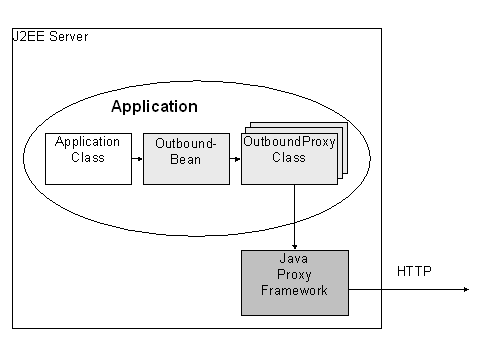
http://service.sap.com/instguides).To send messages from a J2EE application, the application must be programmed against beans that encapsulate all details about the Java runtime. You must have selected the option J2EE Beans in Java proxy generation for this. The following classes are generated:
The classes must be deployed on the J2EE server together with their J2EE application. It is assumed that you are familiar with the programming of beans.
J2EE Sender
To send a message from a J2EE application, the application generates a remote proxy bean and uses it to call the generated outbound method. The bean then calls the corresponding method of the outbound proxy class. This method generates a message from the call and forwards it to the Integration Server using HTTP:

If the application client is a standalone Java program that uses a proxy bean on the J2EE Engine, ensure that the file
J2EE Receiver
On the receiver side, the JPR proxy server monitors the arrival of incoming messages at an HTTP port. The JPR proxy server forwards the message to the corresponding inbound bean using the Java proxy framework. This bean must be registered in the jpf.registry file. It calls the implementing class on the J2EE server using the generated inbound proxy interface (the generated classes are shown in light gray).
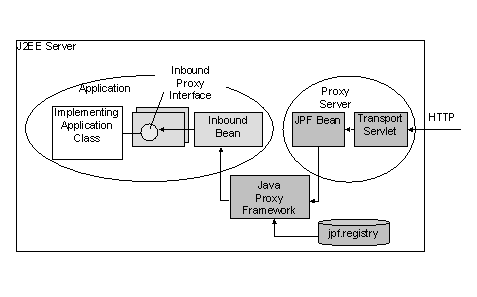
Note the following for the implementing class:
If the message interface has the name
MyInbound, then the Java interface MyInbound_PortType is generated from it that you must implement using the class MyInbound_PortTypeImpl:public class MyInbound_PortTypeImpl
extends AbstractProxy
implements MyInbound_PortType {...}
When the application is deployed, the proxy server is started automatically and it reads the file
jpf.registry. This file must be located in the work directory of the J2EE server. Here you need to specify which message interface from the Integration Repository belongs to inbound bean. Once the proxy server has been started, it knows automatically if entries in the file have been changed and updates its registrations accordingly. A line in this file is structured as follows:<Interface Namespace>#<Inbound Interface>=<Bean Name>:<Bean Method>
<Bean Name> corresponds to the JNDI name of the bean.
<Inbound Interface> is the name of the interface in the Integration Repository. If the character '#', '=' or ' occurs in one of the names then this must be indicated using the escape character backslash (\), as in the following example:
http\://com/sap/aii/proxy/example#Listening=ExampleService:receive
Using this registration, the proxy server would instantiate the bean
ExampleService for an incoming message with the inbound interface Listening in the namespace http://com.sap.aii.proxy.example, and call its method receive.Deployment
When deployed, the J2EE applications must ensure that any dependencies on Java proxy runtime libraries in the file reference.txt in the subdirectory managers of the SAP J2EE Engine are specified. The following entries would be necessary for the application MyOutAPP:
reference MyOutApp library:com.sap.aii.proxy.xiruntime
reference MyOutApp library:com.sap.aii.messaging.runtime
reference MyOutApp library:com.sap.aii.util.misc
reference MyOutApp library:inqmyxml