

 Modifying Documentation
The following document classes can be modified:
Document class |
Maintenance transaction |
Data element |
SE61, SE11 |
Text in dialog |
SE61 |
Data element supplement |
SE61, SE11 |
Function module documentation |
SE37 |
Message |
SE61, SE91 |
Report/module group, Logical database |
SE61, SE38 |
General text |
SE61 |
For example, you want to change the documentation for a data element. Choose Utilities
® Documentation (SE61) from the ABAP Workbench menu. On the lower portion of the screen, enter Data element as your document class and the name of your data element in the Data element field. Now choose Change and make the changes you want. The following dialog box appears: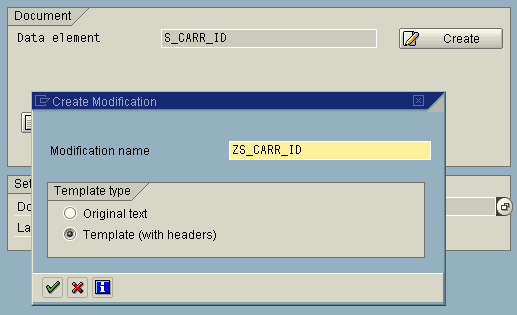
Now assign a name within the customer namespace and decide if you want to modify or enhance a text that already exists (choose the Original text radio button) or if you simply want to use one of the headers stored for this document class in the standard. If you decide on the latter course of action, choose Template (with headers).
Choosing Change from the Utilities ® Documentation menu displays originals only if no modified text is available.
You can reset modifications to their original form by deleting the document from the customer namespace.

You can modify documentation in the Function Builder by choosing the Function module doc. pushbutton in change mode. A dialog box like the one pictured above appears. Function module parameter documentation is not supported in the Modification Assistant.