

 Fault Messages
Definition
A fault message is a message that describes an application-specific error situation.
Use
The proxy generation functions generate exception classes for fault messages in the Integration Repository. If an application triggers an exception using an exception class such as this, the proxy generation function automatically converts it to a fault message. Using the fault message, the application records an application error (for example, Requested customer profile unknown).
Structure
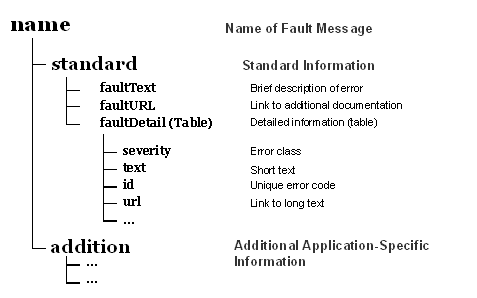
The defined structure
STANDARD contains fields essential for forwarding the error. The structure ADDITION can be used freely by the application.Example
To send a fault message, complete the generated structure for fault messages and trigger the exception with the corresponding exception class:
data: l_standard_data type
<Standard Fault Data Type>,l_standard_data-fault_text =
<Error Text>.append l_detail_data to l_standard_data-fault_detail.
l_additional_data =
<Application Error Information >RAISE EXCEPTION TYPE
<Name of Exception Class>If you use the application log, or have access to error information from a BAPI return table, you can also use these directly to complete the fault message. In this case, you only need to call the method
CL_PROXY_FAULT=>RAISE of the Proxy Framework to trigger the error:CALL METHOD cl_proxy_fault=>raise
EXPORTING
exception_class_name
If you transfer neither a handle of an application log, nor a table with BAPI return information, the method completes the standard data of a fault message as follows:
|
faultText |
Fault message text in the Integration Repository (shortened to 60 characters). |
|
faultUrl |
URL on the long text of this message in the Integration Repository. |
The following additional fields are completed for the data from the application log, or the BAPI return table:
|
faultDetail-severity |
The ABAP message type is mapped to this field as follows: |
|
|
ABAP Feld MSGTY |
Fault Message Field |
|
|
A (Abend) |
error |
|
|
E (Error) |
error |
|
|
W (Warning) |
warning |
|
|
S (Success) |
information |
|
|
I (Information) |
information |
|
|
faultDetail-text |
Formatted T100 message text (in the language in which the service was executed). |
|
|
faultDetail-url |
URL on the T100 long text (if available). |
|
|
faultDetail-id |
Connection from work area and message number (for example, "XY(007)"). |
|
Representing the Data
In the asynchronous case, you can see a fault message in the monitoring of the Exchange Infrastructure. For example, in technical monitoring you can display the fault message in a more readable format by choosing
Additional Information About Error. In the synchronous case, you can integrate a format of this type into your application on the caller side by using the method CL_PROXY_FAULT=>SHOW.