

 Quality Inspection for Handling Units
Use
If you use the Quality Management (QM) component, you can perform quality inspections on
handling units (HU) in Handling Unit Management at delivery item level. Inspection lots can also be automatically created, if the corresponding delivery item is packed. These inspection lots are then created with reference to the HU and always contain a current reference to the assigned HUs.The quantities in inspection stock are managed directly using the HU and not using the inspection lot. This means that during goods movements the currently assigned HUs are determined using the inspection lot and can be transferred.

Transfer postings are then triggered directly also using the HU. The system also checks whether a posting is allowed from inspection stock. For example, while transfer postings within inspection stock are allowed, deliveries of HUs in inspection stock to customers is not permitted.
Prerequisites
In order to inspect handling units in QM, the following prerequisites must be fulfilled:
Features
Inspection Lot Creation
An inspection lot for the HU is automatically created for the following goods movements/events:
Goods Movement/Event |
Inspection Type |
Comments |
Packing in the inbound delivery |
01 |
You use the field Inspection for HU in the inspection setup of the material master (Quality Management view) to determine whether the inspection lot is created at goods receipt or when the shipping notification is created. |
Packing of finished product |
04 |
In general, a lot is not created at goods receipt in storage locations requiring HUs. During packing, a lot is only created if the indicator Inspection for HU is set in the Inspection setup of the material master (Quality Management view). As a result:
Movement Control for Handling Unit
If an inspection lot is assigned to a HU, the inspection lot controls the allowed movements for the HU. The following criteria are important for deciding whether postings are allowed:
You define whether a particular movement is allowed in Customizing for Handling Unit Management.
The indicator Post to insp. stock. in the material master controls whether there is a posting to inspection stock. This stock is managed using the handling unit.
Sample Calculation
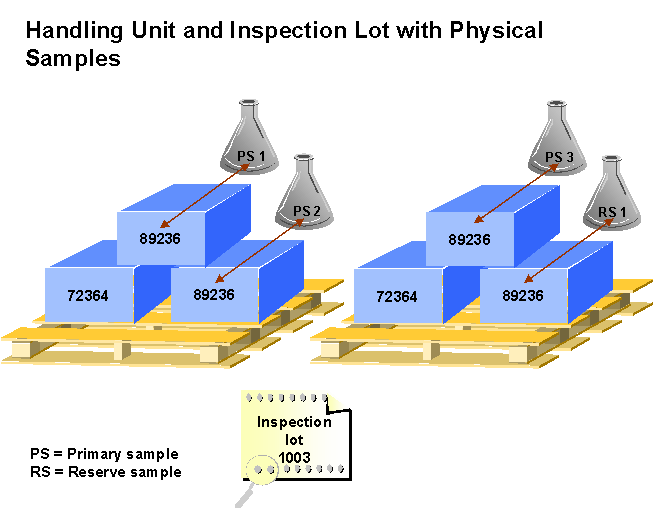
Here it is important whether the respective result is assigned to a HU. If you do not use sample management, there is a reference between the inspection lot and all HUs, however you can no longer trace which result belongs to which HU.
The following options are available for sample calculation:
The unit of measure is specified in the inspection plan in the corresponding characteristics.
For this you require the QM component
 Sample Management. In the
sample-drawing procedure, the indicator Physical-sample drawing by number of containers must be set. The sample-drawing items are used for which the lot container corresponds to the lot container in the inspection lot. If there is no sample-drawing item with the lot container of the inspection lot, the system uses sample-drawing items without a lot container. The base unit of measure for the HU is used as the lot container. The indicator Confirmation requirement must also be set in the sample-drawing item. This means that for physical samples with inspection lots in HU management, the physical sample must also be assigned to the HU when the physical-sample drawing is confirmed.
Sample Management. In the
sample-drawing procedure, the indicator Physical-sample drawing by number of containers must be set. The sample-drawing items are used for which the lot container corresponds to the lot container in the inspection lot. If there is no sample-drawing item with the lot container of the inspection lot, the system uses sample-drawing items without a lot container. The base unit of measure for the HU is used as the lot container. The indicator Confirmation requirement must also be set in the sample-drawing item. This means that for physical samples with inspection lots in HU management, the physical sample must also be assigned to the HU when the physical-sample drawing is confirmed.
Results Recording
During results recording for a single HU item, use the Sample Management component and record results for a physical sample. You can then use the physical sample to assign the results to the HU.
Usage Decision
Since the stock is managed using the HU, the system must dynamically determine which quantities of a material are in the HU and its location when you make the usage decision.
Moreover, the system checks which postings are allowed when HUs or Warehouse Management are used. For example, you cannot trigger a return posting to the vendor, if the goods receipt has not yet been posted. Corresponding information is displayed in a list for each line of the HU.
You can then specify for each handling unit where the stock is posted. The total quantity of a HU item is always posted. If you also want to post partial quantities, you must pack/unpack the corresponding HU either before or after the usage decision is made to update the stock correspondingly.
See also:
Handling Unit Management

