

 Java Standalone Applications
Introductory Notes
The components of the Java Proxy Framework (JPF) must be installed on the computer that functions as the business system (see Installation Guide).
To send messages from a standalone application, the application must be programmed against proxy classes that encapsulate all details about the Java runtime. The same proxy classes are generated as for J2EE applications without bean classes. Also see:
Java Proxy Objects.Sender Side
To send a message using SAP Exchange Infrastructure, simply call the corresponding outbound proxy by transferring the object for the output message:
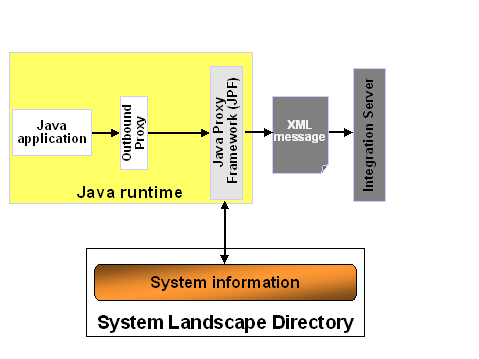
The Java Proxy Framework (JPF) converts the proxy parameters to an XML message and sends it to the Integration Engine, where it is processed further according to the configuration (Routing, Mapping, and so on).
Receiver Side
The Java proxy generation functions generate a Java interface for inbound message interfaces in the Integration Repository. To be able to receive a message using this Java interface, you must first implement the respective interface. The name of the implementing class is already specified and comprises the name of the generated Java interface and the suffix
Impl.The Proxy Framework requires an XML inbound server to process a message that is sent from the Integration Server to a Java application. This server periodically checks whether an XML message has arrived, using an HTTP server:

The XML inbound server is the standalone version of its counterpart, the Java proxy server (J2EE).

When the message arrives, the inbound server attempts to assign the Java interface contacted in the message to an implementing class; you must make this class known to the inbound server using the configuration file
jpf.registry. The Java Proxy Framework then instantiates the implementing class for the Java interfaces, converts the message data into parameters and transfers these parameters to the Java application, by calling the Java method that corresponds to the inbound operation of the inbound interface (you must also specify this method during registration).To conclude, you must do the following to receive a message:
Also see:
XML Inbound Server.