
 Communication Partners
In the example below, multiple receiver systems need to communicate with one sender system:

In this example, the receiver SAP system does not support proxy generation. Instead, an IDoc and an RFC are used on the inbound side. To be able to access the names of these interfaces later during logical routing and mapping, import an XML description into the Integration Repository.
However, you can generate an inbound proxy for the ABAP sender and the Java receiver. To do so, create two message interfaces in the Integration Repository.
Therefore, an outbound message interface can be connected to different receiver interfaces and the other way around. To model or document which interfaces belong together semantically, use a
business scenario.
Interfaces and Message Types
As illustrated in the example above, it is possible to interconnect different interface types. To do so, both interfaces must have the same mode (synchronous or asynchronous), and the parts that determine the
payload of the message must be assigned. When a synchronous proxy communicates with a synchronous RFC module, the following parts must be assigned to each other in the Integration Repository:
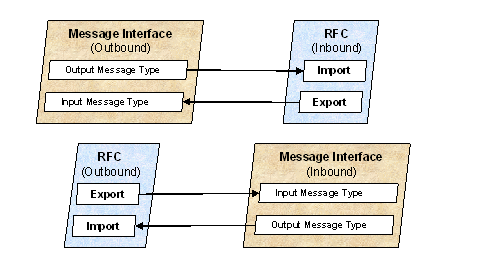
For a message interface, the following is the case:
- The output message type determines how the message to be sent is structured.
- The input message type determines how the received message is structured.
Note the following for different interface types:
- No
data types are created in the Integration Repository when RFCs or IDocs are imported into the Integration Repository. If an imported interface is the counterpart of a message interface, you must create the corresponding data types and message types for the message interface yourself.
- The respective adapter converts the interface call to XML format that is supported by the interface. When an RFC is called, the adapter generates, for example, RFC XML that is supported by the Integration Engine. If the receiver is not the same interface type, for example a proxy (that expects or generates proxy XML), you must map the corresponding fields to each interface by using mappings.
The interfaces are not assigned when they are created, but during logical routing. Furthermore, you also create interface pairs when you define interface mappings.
Assigning Without Importing
The advantage of importing RFCs and IDocs is that a description is saved in the Integration Repository for all interfaces in a cross-system process. This enables you to directly reference the technical name during mapping, routing, or from a business scenario, without having to search for this information in the corresponding systems. However, the Integration Builder only permits you to enter these technical names manually, thus enabling systems from which no interfaces can be imported to be connected.
- For technical reasons, it is only possible to import RFCs and IDocs for SAP systems Release 4.0 or higher. However, the RFC and IDoc adapters can be implemented with SAP systems Release 3.1l and higher. In this case you must enter the interface names manually. More information about IDoc and RFC interfaces Release 3.1l and higher is available in the Interface Repository (
http://ifr.sap.com).
The Adapter Engine supports the connection of external systems that are not necessarily connected by means of an interface (for example, the file adapter). When configuring the inbound adapter, specify instead the ID of the logical sender and receiver by using the respective business system, a namespace, and any interface name.
Although you cannot import this interface information into the central Integration Repository, the Integration Engine still recognizes the corresponding communication partner, provided you entered the
namespace and the interface name correctly in mapping and routing.